How to Find Out Which AI Model Your Computer Can Actually Run Locally — Using LLMfit

YousefAI, Technology Leave a Comment

Back to blogging again, what better to write about than AI! So you’ve been hearing a lot about running AI models locally on your own machine lately — no subscriptions, no sending your data to the cloud, just pure, private AI running straight from your device. Sounds great, right? The problem is, most people have no idea where to even start, and the first wall you hit is figuring out whether your machine can handle it in the first place.

That’s where LLMfit comes in, and honestly, it’s one of those tools I wish I had when I first started going down this rabbit hole.

What Even Is an LLM?

Before we get into the tool itself, let me give you a quick primer if you’re new to all this. LLM stands for Large Language Model — it’s the technology behind AI assistants like ChatGPT, Claude, and others. These models are essentially massive files that your computer needs to load into memory and process in real time when you chat with them.

The catch? Not every model runs on every machine. Some are so large they need a powerful GPU (graphics card) with tons of dedicated memory just to run at a usable speed. Others are smaller and more efficient, built to run on everyday laptops. The tricky part is knowing which one is right for your setup — and that’s exactly what LLMfit solves.

What Is LLMfit?

LLMfit is a free, open-source tool that scans your computer’s hardware — your RAM, CPU, GPU, and VRAM — and then matches you with hundreds of AI models that are actually compatible with your setup. It doesn’t just give you a yes or no answer either. It ranks each model across four key dimensions:

  • Memory Fit — Can your device even load this model without running out of RAM?
  • Speed — How fast will it actually respond on your hardware?
  • Quality — How capable is this model compared to others?
  • Context — How much text can the model handle in one conversation?

Think of it like a compatibility checker — except instead of checking if a game runs on your PC, it’s checking which AI brains your device can handle. Pretty neat.

It runs right in your terminal (don’t worry, I’ll walk you through that) and gives you a clean, interactive interface to browse and compare models side by side.

Before You Install — What’s a Terminal?

📌 New to this? If you’ve never opened a terminal before, don’t stress. It’s basically a text-based window where you type commands to tell your computer what to do, instead of clicking around. On Windows, it’s called PowerShell or Command Prompt. On Mac, it’s called Terminal. We’ll only need it briefly for the install — after that, LLMfit has a visual interface that’s easy to navigate.

Installation

🪟 Windows

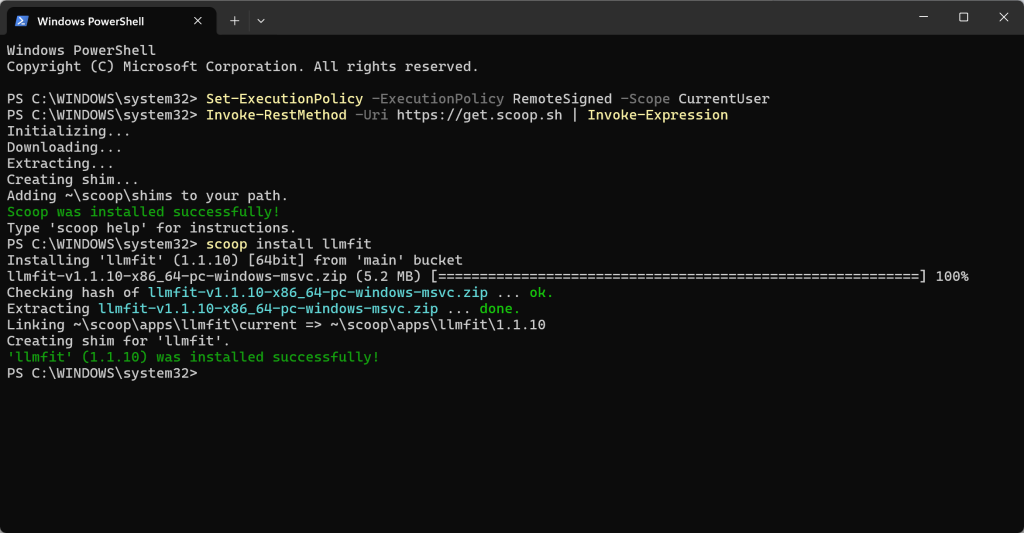
On Windows, we’ll use Scoop — a lightweight package manager that makes installing command-line tools a one-liner. Think of it like a silent app store that works from your terminal.

Step 1 — Install Scoop

Open PowerShell by pressing the Windows Key, typing PowerShell and run the following commands when it works (NB: If it doesn’t work, run as Administrator)

Set-ExecutionPolicy -ExecutionPolicy RemoteSigned -Scope CurrentUser
Invoke-RestMethod -Uri https://get.scoop.sh | Invoke-Expression

Once that’s done, Scoop is installed and ready to go.

Step 2 — Install LLMfit

Still in PowerShell, type this and hit Enter:

scoop install llmfit

That’s it. Scoop handles the download and install automatically. No manual setup, no digging through files, no headaches.

🍎 macOS

On Mac, we’ll use Homebrew — the most popular package manager for macOS. If you’re a Mac user who does any kind of technical tinkering, you’ve probably come across it before.

Step 1 — Install Homebrew

Open Terminal — press Command + Space and type Terminal to find it. Then paste the following and hit Enter:

/bin/bash -c "$(curl -fsSL https://raw.githubusercontent.com/Homebrew/install/HEAD/install.sh)"

It’ll walk you through the setup step by step. Just follow the prompts.

Step 2 — Install LLMfit

Once Homebrew is set up, run this:

brew install llmfit

Alternatively, if you’d rather skip Homebrew entirely and just want a quick install, this one-liner does the job too:

curl -fsSL https://llmfit.axjns.dev/install.sh | sh

Either method works perfectly fine. The Homebrew route is easier to manage long-term since updates are handled automatically whenever you run brew upgrade.

Running LLMfit — Let’s See What Your Machine Can Do

Once LLMfit is installed, open your terminal and type:

llmfit

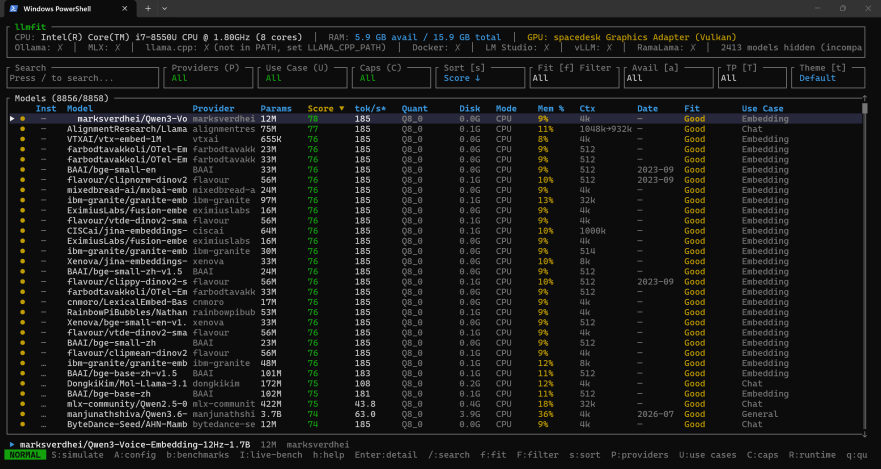
Hit Enter and you’ll be greeted by an interactive table — the TUI (Terminal User Interface). At the top you’ll see your detected hardware specs — RAM, CPU, GPU, and VRAM — automatically pulled from your system. Below that, every model in the catalog is listed and ranked specifically for your machine.
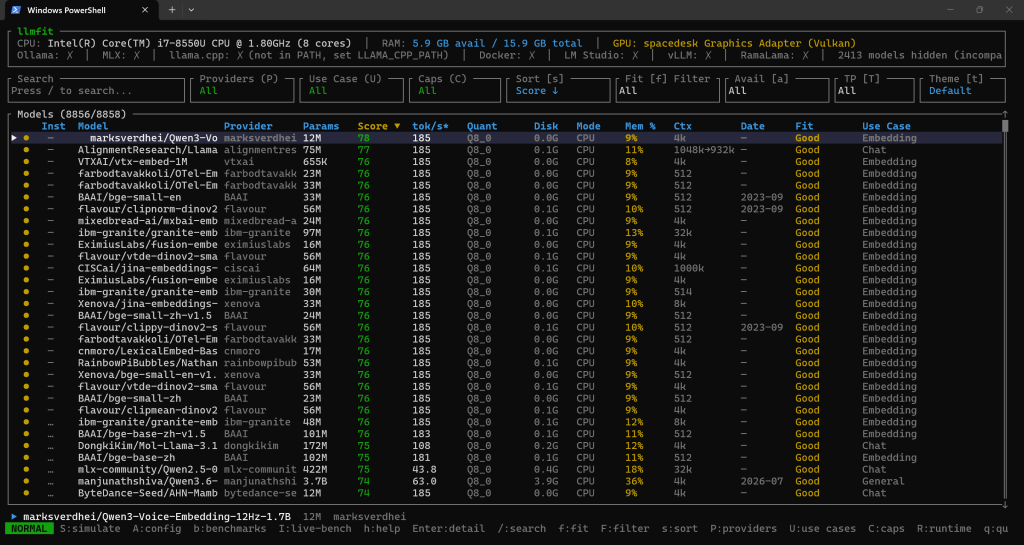
You’ll see columns for fit, speed, quality, and context. Green indicators mean a model runs well on your setup, yellow means it’s pushing it, and red means don’t bother — your device simply isn’t equipped for that one. You can scroll through the list, filter by model size, and get a detailed breakdown for any individual model you’re curious about. (the screenshot above was from one of my older machines which I used today to write this post as i’m currently travelling).

If you just want a quick plain-text table without the interactive view, run:

llmfit fit

Or if you want LLMfit to make the decision for you and return just the top picks:

llmfit recommend --json

No guesswork, no trial and error — just a clear list of what actually works for your setup.

What Happens After You Pick a Model?

Once you’ve identified which model fits your hardware, the next step is actually downloading and running it. LLMfit supports several local runtime providers — these are the applications that load and run the AI model on your device. The main ones include Ollama, LM Studio, llama.cpp, and MLX for Apple Silicon Macs. LLMfit will even point you in the right direction based on the model you’ve selected.

And this is where I’ll leave you hanging for now. 😄

In the next post, we’ll take one of the models LLMfit recommended and actually install and run it locally using Bionic LLM. We’ll go through the whole process step by step — from downloading the model to having a full conversation with it running completely offline on your own machine. Stay tuned, it’s a good one.


Quick Recap

  • LLMfit scans your hardware and tells you exactly which AI models will run well on your device — no guessing involved.
  • On Windows, install it via Scoop in PowerShell.
  • On macOS, install it via Homebrew or the one-line curl command.
  • Run llmfit in your terminal to launch the interactive interface and browse your options.
  • Next post: we’ll use Bionic LLM to download and run your chosen model locally. Stay tuned!

Have questions or running into issues with the install? Drop a comment below and I’ll do my best to help.

ChatGPT Plus subscription now available for Kuwait

YousefTechnology Leave a Comment

Upgrade to ChatGPT plus now available for Kuwait

I’ve been experimenting with ChatGPT for the past couple of weeks now and there have been times when you really need to research a topic, especially when you’re stuck with coding and need that tiny hint but you end up having to wait in the idle screen as they have reached maximum capacity. Well, wait no more, ChatGPT recently introduced the Plus feature in the US, and thankfully didn’t take long to open it up to Kuwait too!

ChatGPT Paid plans

The ChatGPT Plus plan costs $20/month and you’ll say goodbye to the waiting due to high-demand messages and can basically access it any time you like. For $20 it’s a great bargain.

If you would like me to write more about ChatGPT please let me know in the comments section!

Need to know where to repair your mobile or tablet in Kuwait?

YousefMobile phones, Technology Leave a Comment

There are many options available to repair mobile phones and tablets in Kuwait, some of the well-known accessory shops in Kuwait all have mobile repair options and would come to your house and repair your device for you at market rates. Usually, if it is a clear issue such as a battery replacement or replacing a broken screen it’s easy to call and get the rates from the different shops.

However unfortunately for me, my case was a little more complex so I decided to actually go to the repair locations on-site for them to repair my daughter’s iPad pro, which for some reason stopped charging altogether. (one of the main reasons would be that she was using non-apple and USB-C laptop chargers to charge her iPad and she also kept charging her iPad while she was still using it).

Where to find repair shops in Hawally?

Hawally is well known to host a vast array of electronic repair shops and you can find all sorts of electronic repair shops ranging from household electronics to delicate electronics, computers, tablets, and mobile phones. This time around I visited a building that has many wholesale accessory shops for mobiles and tablets in the basement as well as about 4-5 repair shops on the ground floor but you have to walk to the back to find the repair shops all next to each other.

The building is in Ibn-Khaldoon Street about 3 buildings before Luluat bin Khaldoon and this is what the building looks like from the outside:

Photo courtesy of Kuwait Finder (GIS)

Here’s the Kuwait Finder Direct Location to the building: https://kwfinder.page.link/oNWV4

Here’s the Google Maps link to the building :

Here’s the name of the Shop: U.S Workshop (Unlimited Service Workshop)

I went to two shops before deciding to try the US workshop and it’s the one I felt most comfortable leaving my device with tbh. They called and were clear of the items that needed replacing as well as the cost before they did the repair job, as it cost around 35K.D to replace a couple of components that are associated with the power ICU. Although they had to take off the screen to fix, you couldn’t tell that the screen was even removed and the iPad back to life again. Will definitely make sure to go to them for any future repairs. They have a mobile repair option for smaller jobs.

Here are the contact numbers for the workshop:

Mobile: +965 98819333, +965 98819444 or whatsapp: +965 96677852

Or find them on Instagram here

Garage Review: Friends Auto Works – Arif’s Garage

YousefCars, Garage Reviews Leave a Comment

Last month I was In need of replacing my Chevy Silverado’s engine mounts, and to be honest the dealership’s quote was a little expensive and misleading at the same time, as they gave me a quote however they didn’t have the right parts that I wanted for my car’s model. I was at Auto1 for a wheel alignment and the guys there recommended Arif’s Garage as an all-in-one mechanic for GM vehicles and work on engines, transfer cases, the works.

The job took around 4 hours and I can say that they did quite a good job at it and I ended up paying 40% of what I would’ve paid at the dealership without having to keep my car overnight (got the parts from Ahlia also known as Auto1 in Shuwaikh – Canada Dry Road). The only thing I didn’t like was the fact that they didn’t mind pouring water into the coolant reservoir which I thought was very unprofessional as I try to keep the liquids in check and all following the manufacturer’s instructions. So it was good I was there at the time and instructed them not to pour water and went and purchased some AC Delco coolant and got back to them to finish the job.

The location of the shop is close to Abyat and just past the AlKazi’s dealership/garage as seen here below:

Or If you like you can find the Kuwait Finder Link here

All in all, I would rate them 4 out of 5 stars, mainly due to the size and occupancy of the garage, and the fact that I didn’t want to keep my car at the shop overnight. The technicians spoke ok English and knew good Arabic as well, prices are around the moderate range, but it was a big task. I would ask around to gauge market prices first, workmanship was overall ok. Make sure to keep your windows and doors shut as they also clean a lot of engine blocks using petrol/diesel and because it’s a small shop, the smell would stick to your car’s interior.

Here’s Arif’s Number for those who would like to inquire further: +965 65196164

NB: This was not a paid/sponsored review, I liked their work and decided to share (I paid for all work out of pocket).

Verpex – Hosting That Performs The Way You Need It To

YousefBlogging, Wordpress Leave a Comment

I’ve recently migrated away from A2Hosting and selected Verpex to be my next hosting provider hopefully for the long run. It’s difficult changing hosts, but honestly, verpex staff had made it seamless, easy, and were there at the live chat as well as extremely fast support! Day 1 and migrated 3 websites with total ease and no issues.

Check out their website and wordpress hosting packages here!

Largest indoor Go-Kart track opening soon in Kuwait

YousefAnnouncements, Entertainment, Kuwait, Malls, Racing Leave a Comment

Been off blogging for quite a while, and at last, found something great to write about and jump-start me into the posting mode again. Located in AlKout Mall, Q8Karting is the largest indoor multilevel Karting track in the middle east and one of a kind in Kuwait. Q8Karting Karts are fully electronic from the famous Go-Karts manufacturer Sodi.

They have the largest indoor go-kart track with a length of 512 meters split into two tracks, an adult track that’s 392 meters, and a junior’s track which has a length of 83.4 meters. As per their Instagram posts :

  • Junior track is for ages 7-12 and can take up to 12 Karts
  • Adult Track is for ages 13+ and can take up to 36 Karts

I’m still waiting to hear back from Q8Karting for more information, but what I can find out online from the manufacturer Sodi, they only have 1 model of electric go-karts for adults on their website which is the RSX and it boasts an asynchronous 6KW electric brushless motor and last-generation lithium batteries.

To learn more about Q8Karting you can visit their:

Instagram: @q8karting

Website: http://www.q8karting.com

Do you really need 10,000 hours to learn a new skill?

YousefUncategorized Leave a Comment

Came across this video on YouTube and thought of sharing it with you, shows how the telephone paradigm affected our perception on how long it takes us to learn something new. Especially with so much time on our hands these days it nice to know we don’t need to spend 10,000 to learn a new skill and be good at it!

Please feel free to share your thoughts on this!

We are back online!

YousefAnnouncements, Uncategorized Leave a Comment

After a couple of days of downtime, blog is now migrated to a new server and I shall be updating different sections and design elements in batches in the coming days ! Hopefully i will also be starting to post every once in a while and start generating some good and interesting content again!

My Negative Offline Experience with ONCOST’s online grocery store

YousefReview Leave a Comment

OnCostLogo

2 Weeks ago I decided to try out ONCOST’s online website I was tired and couldn’t fathom the idea of going to buy groceries, so I went online and looked for different grocery stores to buy from. Having visited ONCOST’s physical branches and thinking they weren’t bad, and they have just launched their website, which isn’t bad at all and ticked all the correct boxes of we’re trying to do things right (except their add to cart animation effect that’s ridiculously slow btw) their online experience was what you would expect and quite good. However, the unfortunate side of things was when I decided to pay via KNET because today 14 days later I still haven’t received a refund for the order that ONCOST never sent.

I called them up on my scheduled delivery time, and the clerk answered and said we don’t currently have the ONCOST tissue I need to speak to my manager because you already paid online, and the order is just pending the tissue. I was like add anything instead I need my order today, I’m out of baby diapers which I need ASAP and you’re 1 hour late. Half an hour later I call, they never call back and he says the manager is out and I cannot ship your order today due to the missing item “Ma3laish” (the Arabic word for its OK) we’ll send it tomorrow.  What is the point of scheduling shipping appointments a day before and having a well-designed system if the person’s handling the system don’t care if the items are shipped out ONTIME or not? In my case they were way over their due time, never called to apologize and completely ignored my needs which were Milk and Diapers at that specific time, I ended up calling the clerk up which is a disaster as no one answer’s the phone and there is no one call center to handle customer complaints you have to call each store individually and ask for the eCommerce clerk (which sometimes never picks up as he’s one person only) which is totally a negative experience and ONCOST’s  management wouldn’t know if there are issues with customer or be able to identify area’s of improvement.

I keep sending emails, and made 2 phone calls, no one answers. Most probably will give them 2 more days before heading off to report them to consumer protection. But so far my experience was very bad, I’m not sure if it’s related to a specific branch (Fahaheel in my case) or it’s the same all around. What are your experiences?

I hope this message get’s to the management at ONCOST and that they take my points into consideration to improve their online services, their website ticks all the right boxes but their logistics and their offline support would kill any chances of it being successful (this is based on my personal experience with my personal views based on my experiences).

Did anyone try ONCOST’s online website? What were your thoughts?

[/et_pb_text][/et_pb_column][/et_pb_row][/et_pb_section]

Review: Zolo Liberty+

YousefElectronics, Music, Review, Technology Leave a Comment

I bought the Zolo liberty+, thinking it would be the answer to all my needs, the advertisements online were very intriguing, they were all over the internet like no other. I bought the backer’s edition not identifying that Anker were behind the headsets.

LibertyPlus 

I originally bought the backer’s limited edition Champaign Gold First Batch Special for $109. It theoretically should have had a Carbon fiber case but at their 18th project update they gave us the bad news :

“We have also finalized the design for the champagne gold version, however we’ve had to remove the carbon fiber texture from the charging case. We were unable to predict the complications of applying fiber texture to a curved surface. This was an extremely regrettable oversight on our part. We believe it’s better to remove the carbon fiber texture from the design to ensure that you receive the highest possible quality product. “

So I ended up getting a headset very similar to what they are offering for everyone, with a simple color difference in the logo and the case logo and $35 less, which is ok, but not for a backer’s edition.

Now for the pros :

  • Excellent battery life (better than AirPods)
  • Very good music sound quality and good base compared to apple AirPods.
  • Good ear fitment with multiple tips for different ear sizes.
  • Charging case has  3 LED charge level indicators
  • Good noise cancelling but feels more like having ear plugs in your ears.

The Cons :

  • Voice calls and1 headset mode can only be made using the right earpiece and !!! – This was a huge disappointment as they never mentioned it on the kickstarter page only in the FAQ’s “Only the right earpiece will work independently.” and  “All sound is delivered in stereo apart from phone calls and smart assistants”. These FAQ’s I only read after trying to figure out why the left earpiece is not working. ! I usually use the left earpiece stand alone especially if someone is riding in the car with me.
  • Charging case is large and is quite bulky
  • Noise cancelling transparency feature is a disgrace! Its like walking around with noise cancelling headphones connected to microphones which amplify surrounding volume, nothing like Bose’s noise cancelling bypass feature.
  • Button actions aren’t very user intuitive and you’ll go back to the manual a coupe of times.

In my personal opinion had I known all of this I probably wouldn’t have purchased the headset and wouldn’t recommend them.